Contents by Categories

Most of the examples in this blog using Matlab as the programming tool for this moment, however, other software examples will be uploaded in the future.

The following list is the full content by categories, and it will be updated everytime a new post is posted. The full content sorted by date could be found by clicking on the link at the side panel of this page or at the bottom of every page.

p/s : Matlab is the registered trademark of The Mathworks Inc. The link to the page could be found at the side panel as well.


LabVIEW Examples:-


  • Video Processing: From Offline to Online


  • Downloads:-


  • Download Examples by Author


  • General:-


  • Maple for Image Processing (II)

  • Maple for Image Processing?

  • Which Software to Use?

  • What is Image Compression?

  • Adding Object on Images:-


  • Fill The Area Between 2 Lines

  • Converting Pixels to Line

  • Drawing Circles Around Round Object

  • Drawing Transparent Object

  • Drawing Shapes by Overwriting Pixel Value


  • Object Detection:-


  • Measuring Object Length (with a Reference Object)

  • Hough Transform For Hyperbola Detection - with known eccentricity

  • Hough Transform For Circle Detection - with unknown radius (II)

  • Detecting Objects' Motion in 2 Subsequence Images

  • Hough Transform For Circle Detection - with unknown radius (I)

  • Hough Transform For Circle Detection - with known radius (II)

  • Hough Transform For Circle Detection - with known radius (I)

  • Simple Code for Hough Transform

  • Signature of Binary Objects

  • Object Detection using Hough Transform (II)

  • Object Detection using Hough Transform (I)

  • Detecting Objects' Shape(III) : Triangle Object

  • Detecting Objects' Shape(II) : Square Object

  • Detecting Objects' Shape(I) : Round Object

  • Detecting Object in an Image


  • Character Recognition:-


  • Character Recognition Example: An Explanation On the Simple Concept Used in This Demo

  • Character Recognition Example (III):Training a Simple NN for classification

  • Character Recognition Example (II):Automating Image Pre-processing

  • Character Recognition Example (I): Image Pre-processing


  • Other Examples:-


  • Playing with “Edge Detection”

  • Panoramic Picture Creation


  • Useful Resources:-


  • Useful software could be found from the link at the sidebar

  • Useful keyword to seacrh for this blogs: image processing, image analysis, edge detection, matlab, maple, mathematica, mathcad


  • Code Udpates/Error Corrections:-


  • Do notes that for all the Circle Det

  • Download Examples by Author

    For those who are not aware, most of the examples descript here had been post in MATLAB Central:

    1. Speech Analysis using LPC

    2. Character Recognition Example (III):Training a Simple NN for classification

    3. Simple DIP demos

    4. Video Surveillance Using MATLAB and Image Acquisition Toolbox

    5. Icon Menu

    6. Character Recognition Example (I&II): Pre-processing of Image

    7. Simple Shape Detection using Hough Transform

    8. DTMF generator using TI C6711 DSK

    9. Using RTW and Compiler

    10. Hough Transform for Circle Detection (GUI)

    11. Drawing Transparent Object on Image

    Maple for Image Processing (II)

    More Functions for Image Processing in Symbolic Tools

    Found more image processing functions in Maple 11, however, doesn't have much time to explore much.

    http://www.maplesoft.com/applications/app_center_view.aspx?AID=2059&CID=10&SCID=149

    Well, since this is the first article after one year, at least it is a new start. :)

    Measuring Object Length (with a Reference Object)

    It has been a long long time I've not update this blog due to my new notebook modem spoiled just after I bought it! The support staff came 3 times and now I am waiting for a replacement model...

    Further more, life become more and more busy, and sometimes I really out of idea what to post here. :P

    Until I receive some e-mail from some reader...

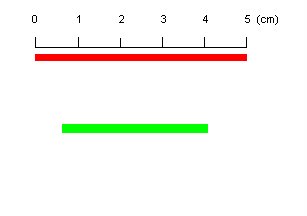
    This is rather a simple example to measure a length of an object in an image. We could easily get the reading in pixels, and with a reference, we could just use a simple mathematic to compute the lenght in some standard unit.

    Let's see this simple example:

    1. Reading image and show the true color image.
    clear all;clc;
    I = imread('pic29.tif');
    imshow (I);


    2. Assuming that we know the length of the red object (as reference) which is 5 cm, locate the red object with simple command and find the length in pixels:


    Ired_labeled = bwlabel(Ired);
    Ired_props = regionprops(Ired_labeled);
    Ired_length_in_pixel = Ired_props.BoundingBox(3);
    disp(Ired_length_in_pixel);

    212

    3. To measure the length of the green object, extract the object:

    Igreen_labeled = bwlabel(Igreen);
    Igreen_props = regionprops(Igreen_labeled);
    Igreen_length_in_pixel = Igreen_props.BoundingBox(3);
    disp(Igreen_length_in_pixel);

    146


    4. Calculate the length of green object in cm

    Igreen_length_in_cm = Igreen_length_in_pixel/Ired_length_in_pixel*5;
    disp(Igreen_length_in_cm);

    3.4434

    Character Recognition Example: An Explanation On the Simple Concept Used in This Demo

    After I posted these series of examples, I’ve received a few comments from readers. Some of them using different version of software and can’t run the program successfully, some were happy with the simple code in which they had applied it to some other application, while a few readers were asking for more explanations on how these code work.

    Well, I believe I’ve answered the doubt on the different version issue, but not the doubt on more details explanations. Here, I tried to draft a few paragraph to explain the concept hidden behind the code, and hope it helps to answer the readers who ask me about it though email.

    1. Image Preprocessing

    The image is first being converted to grayscale image follow by the threshing technique, which make the image become binary image. The binary image is then go through connectivity test in order to check for the maximum connected component, which is, the box of the form. After locating the box, the individual characters are then cropped into different sub images that are the raw data for the following feature extraction routine.

    The size of the sub-images are not fixed since they are expose to noises which will affect the cropping process to be vary from one to another. This will causing the input of the network become not standard and hence, prohibit the data from feeding through the network. To solve this problem, the sub-images have been resize to 50 by 70 and then by finding the average value in each 10 by 10 blocks, the image can be down to 5 by 7 matrices, with fuzzy value, and become 35 inputs for the network. However, before resize the sub-images, another process must be gone through to eliminate the white space in the boxes.

    2. Feature Extraction

    The sub-images have to be cropped sharp to the border of the character in order to standardize the sub-images. The image standardization is done by finding the maximum row and column with 1s and with the peak point, increase and decrease the counter until meeting the white space, or the line with all 0s. This technique is shown in figure below where a character “S” is being cropped and resize.


    The image pre-processing is then followed by the image resize again to meet the network input requirement, 5 by 7 matrices, where the value of 1 will be assign to all pixel where all 10 by 10 box are filled with 1s, as shown below:

    Finally, the 5 by 7 matrices is concatenated into a stream so that it can be feed into network 35 input neurons. The input of the network is actually the negative image of the figure, where the input range is 0 to 1, with 0 equal to black and 1 indicate white, while the value in between show the intensity of the relevant pixel.

    3. Neural Network Training

    Well, I have just met a lecturer in my country and we had a short discussion on the NN for classification purpose. Both of us agree that while using simple FF-BP-NN for classification, the more important thing is the pre-processing of the data. “Rubbish-in, rubbish-out”, always true… So if you were to use NN after this process, it should be quite straight forward after you get the features, which is 5 by 7 = 35 values.