I’ve chance to use LabVIEW for image and video processing, while having fear in converting from the software I used to, I found a lot of fun and excitement playing around with the LabVIEW Vision Development Module and Vision Assistant.
Here how it goes:
1. Using LabVIEW Vision for offline Image Processing
Contents by Categories
Most of the examples in this blog using Matlab as the programming tool for this moment, however, other software examples will be uploaded in the future.
The following list is the full content by categories, and it will be updated everytime a new post is posted. The full content sorted by date could be found by clicking on the link at the side panel of this page or at the bottom of every page.
p/s : Matlab is the registered trademark of The Mathworks Inc. The link to the page could be found at the side panel as well.
LabVIEW Examples:-
Downloads:-
General:-
Adding Object on Images:-
Object Detection:-
Character Recognition:-
Other Examples:-
Useful Resources:-
Code Udpates/Error Corrections:-
Download Examples by Author
For those who are not aware, most of the examples descript here had been post in MATLAB Central:
1. Speech Analysis using LPC
2. Character Recognition Example (III):Training a Simple NN for classification
3. Simple DIP demos
4. Video Surveillance Using MATLAB and Image Acquisition Toolbox
5. Icon Menu
6. Character Recognition Example (I&II): Pre-processing of Image
7. Simple Shape Detection using Hough Transform
8. DTMF generator using TI C6711 DSK
9. Using RTW and Compiler
10. Hough Transform for Circle Detection (GUI)
11. Drawing Transparent Object on Image
1. Speech Analysis using LPC
2. Character Recognition Example (III):Training a Simple NN for classification
3. Simple DIP demos
4. Video Surveillance Using MATLAB and Image Acquisition Toolbox
5. Icon Menu
6. Character Recognition Example (I&II): Pre-processing of Image
7. Simple Shape Detection using Hough Transform
8. DTMF generator using TI C6711 DSK
9. Using RTW and Compiler
10. Hough Transform for Circle Detection (GUI)
11. Drawing Transparent Object on Image
Maple for Image Processing (II)
More Functions for Image Processing in Symbolic Tools
Found more image processing functions in Maple 11, however, doesn't have much time to explore much.
http://www.maplesoft.com/applications/app_center_view.aspx?AID=2059&CID=10&SCID=149
Well, since this is the first article after one year, at least it is a new start. :)
Found more image processing functions in Maple 11, however, doesn't have much time to explore much.
http://www.maplesoft.com/applications/app_center_view.aspx?AID=2059&CID=10&SCID=149
Well, since this is the first article after one year, at least it is a new start. :)
Measuring Object Length (with a Reference Object)
It has been a long long time I've not update this blog due to my new notebook modem spoiled just after I bought it! The support staff came 3 times and now I am waiting for a replacement model...
Further more, life become more and more busy, and sometimes I really out of idea what to post here. :P
Until I receive some e-mail from some reader...
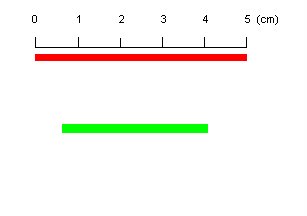
This is rather a simple example to measure a length of an object in an image. We could easily get the reading in pixels, and with a reference, we could just use a simple mathematic to compute the lenght in some standard unit.
Let's see this simple example:
1. Reading image and show the true color image.
clear all;clc;
I = imread('pic29.tif');
imshow (I);

2. Assuming that we know the length of the red object (as reference) which is 5 cm, locate the red object with simple command and find the length in pixels:
Ired_labeled = bwlabel(Ired);
Ired_props = regionprops(Ired_labeled);
Ired_length_in_pixel = Ired_props.BoundingBox(3);
disp(Ired_length_in_pixel);
212
3. To measure the length of the green object, extract the object:
Igreen_labeled = bwlabel(Igreen);
Igreen_props = regionprops(Igreen_labeled);
Igreen_length_in_pixel = Igreen_props.BoundingBox(3);
disp(Igreen_length_in_pixel);
146
4. Calculate the length of green object in cm
Igreen_length_in_cm = Igreen_length_in_pixel/Ired_length_in_pixel*5;
disp(Igreen_length_in_cm);
3.4434
Further more, life become more and more busy, and sometimes I really out of idea what to post here. :P
Until I receive some e-mail from some reader...
This is rather a simple example to measure a length of an object in an image. We could easily get the reading in pixels, and with a reference, we could just use a simple mathematic to compute the lenght in some standard unit.
Let's see this simple example:
1. Reading image and show the true color image.
clear all;clc;
I = imread('pic29.tif');
imshow (I);

2. Assuming that we know the length of the red object (as reference) which is 5 cm, locate the red object with simple command and find the length in pixels:
Ired_labeled = bwlabel(Ired);Ired_props = regionprops(Ired_labeled);
Ired_length_in_pixel = Ired_props.BoundingBox(3);
disp(Ired_length_in_pixel);
212
3. To measure the length of the green object, extract the object:
Igreen_labeled = bwlabel(Igreen);Igreen_props = regionprops(Igreen_labeled);
Igreen_length_in_pixel = Igreen_props.BoundingBox(3);
disp(Igreen_length_in_pixel);
146
4. Calculate the length of green object in cm
Igreen_length_in_cm = Igreen_length_in_pixel/Ired_length_in_pixel*5;
disp(Igreen_length_in_cm);
3.4434
Subscribe to:
Posts (Atom)



